
Candidates who registered for the SSC CGL exam can only download their exam slip from the official portal, ssc.gov.in . The city slip is an important document containing the name of the city allotted to the candidate that allows applicants to make their travelling arrangements well in advance so that there is no last minute hassle. SSC CGL 2026 Exam City Slip Out: The Staff Selection Commission (SSC) has released the Combined Graduate Level (CGL) examination city intimation slip 2026.

SSC CGL Exam 2026: What’s Next
Now that the CGL exam city slip has been released, the next step in the process is the release of the admit card by the commission. The SSC CGL hall ticket will be released three to four days before the exam date. Once released candidates must take a printout of their admit card and carry it on the day of the examination.
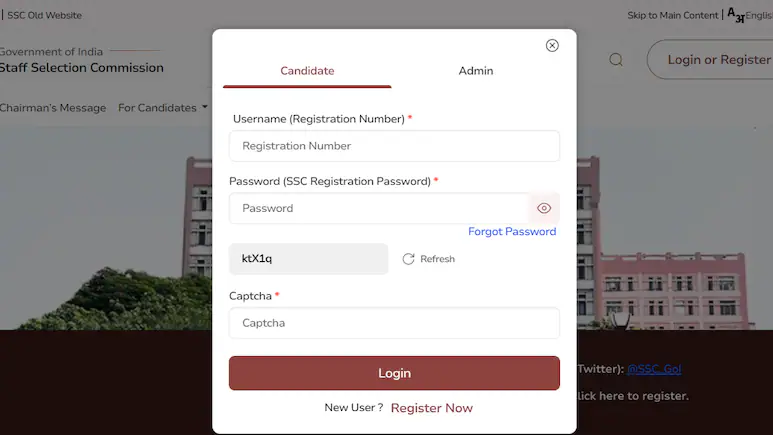
Download the city slip and make the travel arrangements accordingly. The SSC CGL 2026 city slip is officially out, candidates can follow the steps below to download the same. Step 1: Visit the official website, ssc.gov.in . Step 2: On the top of the homepage, click on the login or register option. Step 3: Once clicked on the link, a new login window will appear on the screen. Step 4: Enter the required login details such as registration number, password and captcha code. Step 5: Now under the exam centre, click on SSC CGL exam 2026. Step 6: The SSC CGL exam city intimation slip will be displayed on the screen.
Important Details About the SSC CGL Exam City Slip
Candidates preparing for the SSC CGL Tier 1 exam 2026 should be aware that the advance city slip is not the official admit card. Instead, it serves as preliminary information regarding the examination location. To access the exam city slip, candidates must log in using their registration number and password.
The SSC CGL Tier 1 exam is scheduled to take place from September 30 to October 30, 2026, and will be conducted in a computer-based test format.
